Automated LinkedIn Posts with AWS Lambda and Bedrock — An Approval-First Approach
Writing blog posts is one thing. Getting people to actually read them is another. LinkedIn is an obvious channel — but if you’re going to automate, do it properly from the start. So I built a pipeline that automatically turns new articles into LinkedIn post drafts — with an approval step built in, because AI-generated text going straight to production without review is not something I’m comfortable with.
The Idea
Every new English blog post should automatically trigger a LinkedIn post draft generated by Claude via Amazon Bedrock. I review it, click approve, and it goes live. No scheduler, no cron job — the approval click is the publish trigger.
The architecture looks like this:
S3: new article deployed
  → SNS: sensei-post-changed
    → Lambda: Orchestrator
        ├─ Language check (.en. in key)
        ├─ Frontmatter check (socialmedia: true)
        ├─ Bedrock: generate LinkedIn post text
        ├─ DynamoDB: save (status: pending)
        └─ SES: send approval email

Email link: /approve?postId=xxx
  → Lambda: Approver
      ├─ DynamoDB: pending → publishing  (distributed lock)
      ├─ Scrape og:image URL from article page
      ├─ Upload image to LinkedIn (register + PUT)
      ├─ LinkedIn ugcPosts API: IMAGE post (text + image)
      ├─ LinkedIn socialActions API: comment with article URL
      └─ DynamoDB: publishing → sent + postUrl
The Trigger Mechanism
The frontend pipeline already had something useful: after each Hugo build, it syncs hash-based trigger files to S3:
find content/posts -name "*.md" | while read md_file; do
  slug=$(echo "$md_file" | cut -d'/' -f3)
  lang=$(basename "$md_file" | cut -d'.' -f2)
  hash=$(md5sum "$md_file" | cut -d' ' -f1)
  mkdir -p "/tmp/post-triggers/$slug"
  cp "$md_file" "/tmp/post-triggers/$slug/index.$lang.$hash"
done
aws s3 sync /tmp/post-triggers/ s3://$WEBSITE_BUCKET/_content/posts/ --size-only --delete
When a post changes, the hash changes, a new file gets uploaded, S3 fires a PutObject event to an SNS topic. The SNS topic was already there — I just needed to subscribe a Lambda to it.
One important change: previously these were empty touch files with the hash in the filename. I changed them to cp — so the file is the markdown. The Lambda reads the object content directly from the S3 event, no second lookup needed.
The Frontmatter Flag
Not every post should automatically generate a LinkedIn post. I added a simple boolean to the Hugo frontmatter:
---
title: "My Post"
socialmedia: true
---
The Lambda checks this as the first thing after the language filter. No socialmedia: true → silent return, nothing happens.
SNS Filter Policies and a Surprise
I wanted to filter for English posts directly in the SNS subscription using the contains operator on the S3 object key:
{"Records": {"s3": {"object": {"key": [{"contains": ".en."}]}}}}
This works via the AWS API. It does not work via CloudFormation. The contains string operator for SNS filter policies is not supported in CloudFormation templates — you get a validation error at deploy time. For now: move the filter into the Lambda itself.
if ".en." not in key:
    print(f"Skipping {key}: not an English post")
    return
One line. Works just as well.
The LinkedIn Developer App Setup
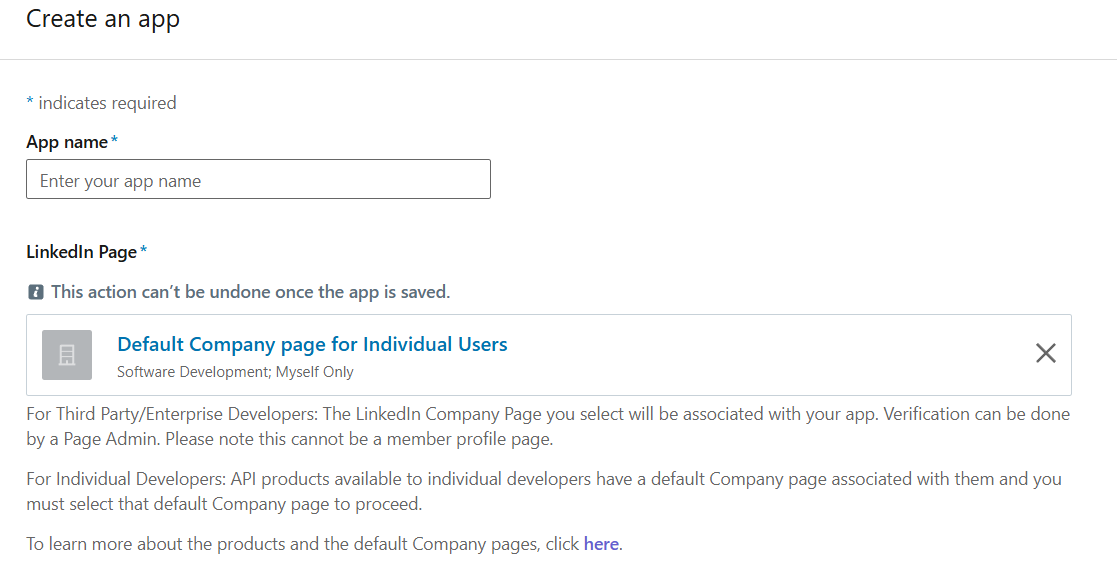
Getting the LinkedIn API access was the most friction-heavy part. The developer portal requires a Company Page to be associated with every app. As an individual developer, LinkedIn provides a “Default Company Page for Individual Users” — but this is nowhere documented clearly. The page is pre-selected in the form but labelled in a way that makes it look like you need to create something first.
You don’t. Select it and move on.
The OAuth scopes you need:
w_member_social— for posting (via the “Share on LinkedIn” product)openid+profile— for reading your person ID (via “Sign In with LinkedIn using OpenID Connect” product)
Both products get approved instantly for individual developers.
After the OAuth dance, store the access_token and person_id in Secrets Manager:
aws secretsmanager put-secret-value \
  --secret-id sensei/linkedin/oauth \
  --secret-string '{"access_token":"...","person_id":"..."}'
Note: LinkedIn access tokens expire after 60 days. Token refresh is on the backlog.
Idempotency
Two failure modes to think about:
SNS at-least-once delivery — the Orchestrator Lambda could be called multiple times for the same S3 event. Using a random UUID as postId would create duplicate pending posts. Fix: use a deterministic ID based on the post slug:
post_id = hashlib.md5(slug.encode()).hexdigest()

table.put_item(
    Item={...},
    ConditionExpression="attribute_not_exists(postId)",
)
The second invocation hits the condition and returns silently. Using the slug (not the S3 key) also prevents a new draft from being generated every time the article is edited — one LinkedIn post per article, regardless of how many times the source file changes.
Concurrent approval clicks — clicking the email link twice quickly could call the LinkedIn API twice before DynamoDB updates. The naive fix (conditional update after posting) doesn’t help because both invocations already passed the status check.
The correct fix: claim the post before calling LinkedIn using a publishing intermediate status:
# Step 1: atomic claim — only one Lambda wins
table.update_item(
    ConditionExpression="#s = :pending",
    UpdateExpression="SET #s = :publishing",
    ...
)

# Step 2: now safely call LinkedIn
post_url = post_to_linkedin(access_token, person_id, content)

# Step 3: mark as sent
table.update_item(UpdateExpression="SET #s = :sent, postUrl = :url", ...)
The pending → publishing update is atomic in DynamoDB. The second Lambda’s conditional update fails immediately and returns “Already posted” — before any LinkedIn API call is made.
The LinkedIn Card Size Problem
After the pipeline was working, I noticed the posts appeared with a small thumbnail on the left instead of a full-width image. Digging into it: LinkedIn changed how external link previews work in 2024. Organic posts that share external URLs now always get the compact card format — no matter what your og:image dimensions are.
The workaround used by most people: don’t attach the URL as an article link. Post the image directly to LinkedIn and put the URL in the first comment. LinkedIn treats a directly uploaded image as native content, which gets the full-width display. The URL in the comments is still clickable, and keeping it out of the post body also helps with LinkedIn’s algorithm (external links reduce reach).
So the Approver now does a few extra steps:
- Scrape the
og:imageURL from the published article page - Register an image upload slot with the LinkedIn Assets API
PUTthe image binary to the upload URL- Create the post with
shareMediaCategory: IMAGE - Post the article URL as the first comment via the socialActions API
If the OG image can’t be scraped for any reason, it falls back to a text-only post (shareMediaCategory: NONE).
The Bedrock prompt was updated accordingly — the generated text ends with “Link in the comments.” instead of the URL.
Why Approval-First?
The approval step is not overhead — it’s the point. AI-generated text occasionally sounds off, misses the tone, or emphasizes the wrong thing. Having a human review step before anything goes public keeps the quality bar where it should be.
The workflow:
- Publish a blog post with
socialmedia: true - Receive an email preview with the generated LinkedIn post
- Click “Approve & Post to LinkedIn”
- Done
The click IS the publish. No scheduler needed, no optimal-time magic. The right time to post is when you decide to post.
What’s Next
Token refresh before the 60-day expiry→ done- Edit functionality in the approval email (in case the generated post needs tweaking)